What's New

Follow new updates and improvements to GameGlass.

GameGlass Devices are here!
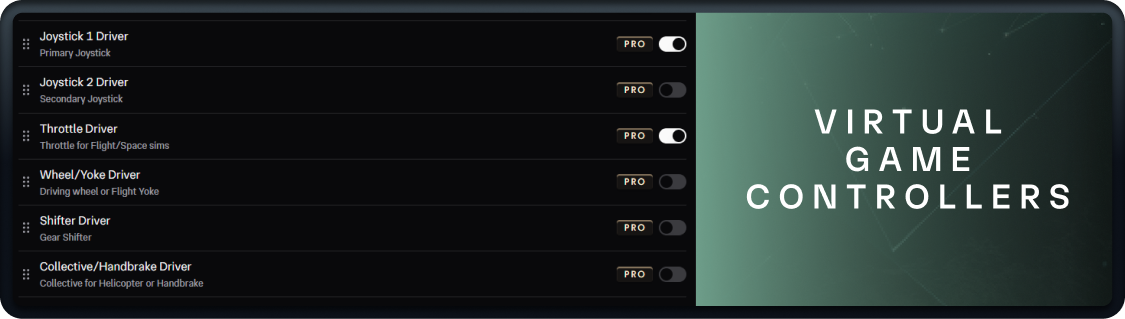
For a long while we have been working to add virtual game controllers to our driver software, and we’re excited to announce that they’re now available.

These emulate hardware devices, and give you digital versions of peripherals like joysticks and steering wheels. You can enable them in Settings in the GameGlass Hub.

Alongside these devices, we’ve added two new actions the Action Manager:

  • Device Button

    • This triggers a button input from a GameGlass device (such as Joystick, Throttle, etc). Like any other action, you can assign these to Press, Release or Press/Release

  • Device Input

    • This triggers an axis or linear input from a GameGlass device. For example, a joystick axis change or a throttle linear input

As with all other actions, you can combine them with other actions to build macros.

We’ve also added the input states of these devices as variables in the Forge. For now they just help with testing your component actions, but soon you’ll be able to use them with new kinds of components and actions. Like the Slider component we teased in the last update.

Copy Feature Update

New copy and paste functionality has been added to the Forge, designed to make it easier to create different versions a Shard (for example copy components from a tablet Shard to one designed for phones), or to help you create a “master” collection of components you want to use in other Shards.

Here’s the details:

  • Added the ability to copy and paste components between Shards

    • Yep, you can now design and configure a component and copy it to as many Shards as you like. This includes groups of components

    • Any design properties (borders, typography, etc) will be copied

    • If the theme of the new Shard is different from the source Shard, you’ll be asked which you want to use

  • There are some limitations:

    • You cannot copy components from PRO Shards to non-PRO Shards

    • PRO components can’t be copy and pasted by users without GameGlass PRO

Finally, we’re working on a whole set of Xeneon-specific versions of our PRO Shards. Stay tuned for some exciting announcements related to these…

GameGlass Hub 8.2 released

This update brings a host of quality of life changes and new features to the GameGlass Hub and Forge.

RELEASE NOTES:

  • New features

    • Added zoom feature to the Forge canvas

    • Added keyboard shortcut helper next to Forge zoom feature for visibility

    • Added ability to reorder GameGlass driver devices

    • Added GameGlass driver devices variables to Forge

      • Device actions are coming to the Forge soon!

  • Updates & fixes

    • Fixing overlay not closing on logout

    • Adding warning when logging out/exiting app if forge is open to prevent losing work

    • Changed GameGlass driver devices to only Joystick 1 and Throttle are enabled by default to prevent cluttering in-game menus

We’re also making a change to the availability of Plugins and GameGlass driver devices - they are now only available to PRO (subscriber or Lifetime) users. We’re adding a substantial number of features to these two areas in the near future and this change allows us to invest further in development.

COMING SOON!

  • Sliders attached to device axis - like joysticks and throttles - with customization options so you can build them as relative, absolute, release to return, etc.

  • Device/action tester to help create and troubleshoot keybind setups for both Shards and your gaming peripherals

  • Ability to copy components between Shards.

Finally, stay tuned for news on Xeneon versions of our PRO Shards.

As always, thanks for being your awesome self.

Cheers,

The GameGlass team.

Announcement

Massive Mid Year Sale - On Now!

For a limited time, you can upgrade your gaming experience with 26% off all subscriptions and lifetime plans throughout the month of August.

Whether you're looking to streamline your cockpit controls or fully immerse yourself in your favorite titles, now is the best time to unlock the full power of GameGlass.

💰 How to Save:

  1. Choose any subscription or lifetime plan at checkout.

  2. Enter promo code: MIDYEARSALE26

  3. Save 26% instantly!

⏰ Sale ends Sept. 1st.

GameGlass Overlay out of Beta

As of version 8.1.3 of GameGlass Hub, Overlay is officially out of beta!

With Overlay, you can use any secondary touchscreen monitor to interact with Shards - no tablet or phone required. Don't have a touchscreen? No problem use your mouse, or simply set it up to display live stats and variables.

GameGlass iCUE Widget

We’ve been working closely with Corsair on GameGlass compatibility for the Xeneon Edge.

You can now install a GameGlass iCUE Widget seamlessly alongside your game, and as of iCUE version 5.48.58 Xeneon widgets no longer steal game focus.

Currently cooking: Drivers

Some eagle-eyed users might have spotted these in the settings. They aren't quite ready yet - we caught an issue where Windows was prioritizing our virtual drivers over physical devices like joysticks and wheels. We’re working on a fix, as well as brand-new components to pair with them: sliders, dials, trackpads, and more.

A whole new realm of control options is right around the corner...

That’s all for now - Happy Gaming!

Team GameGlass

Announcement

Earlier updates